
Cookie Jar
A Chrome extension that reads, categorizes, and blocks unwanted cookies — built after a judge at a designathon said she'd be our first customer.
Overview
Design Frontiers is a designathon run by Design CO at UCSD. Our team of four had 24 hours to design a product. We built a concept for a Chrome extension that would read, categorize, and automatically block unwanted browser cookies — the kind of thing that handles cookie consent banners for you so you stop clicking "Reject All" on every website you visit.
We won second place. In the feedback session, one of the judges said she'd be the first customer when we built it. I don't think she expected anyone to take that literally.
I was the only person on the team with programming experience. The other three had handled the research, the UI/UX, and the branding — I'd contributed to the design work too, but I was also the only one who could actually build it. So I did.
- Renee Lau — UI/UX
- Yaena Chun — UI/UX
- Kiley Ku — graphic design
- Jonathan Ty — UI/UX, development
Design Frontiers, Design CO @ UC San Diego, May 2026.
What it does
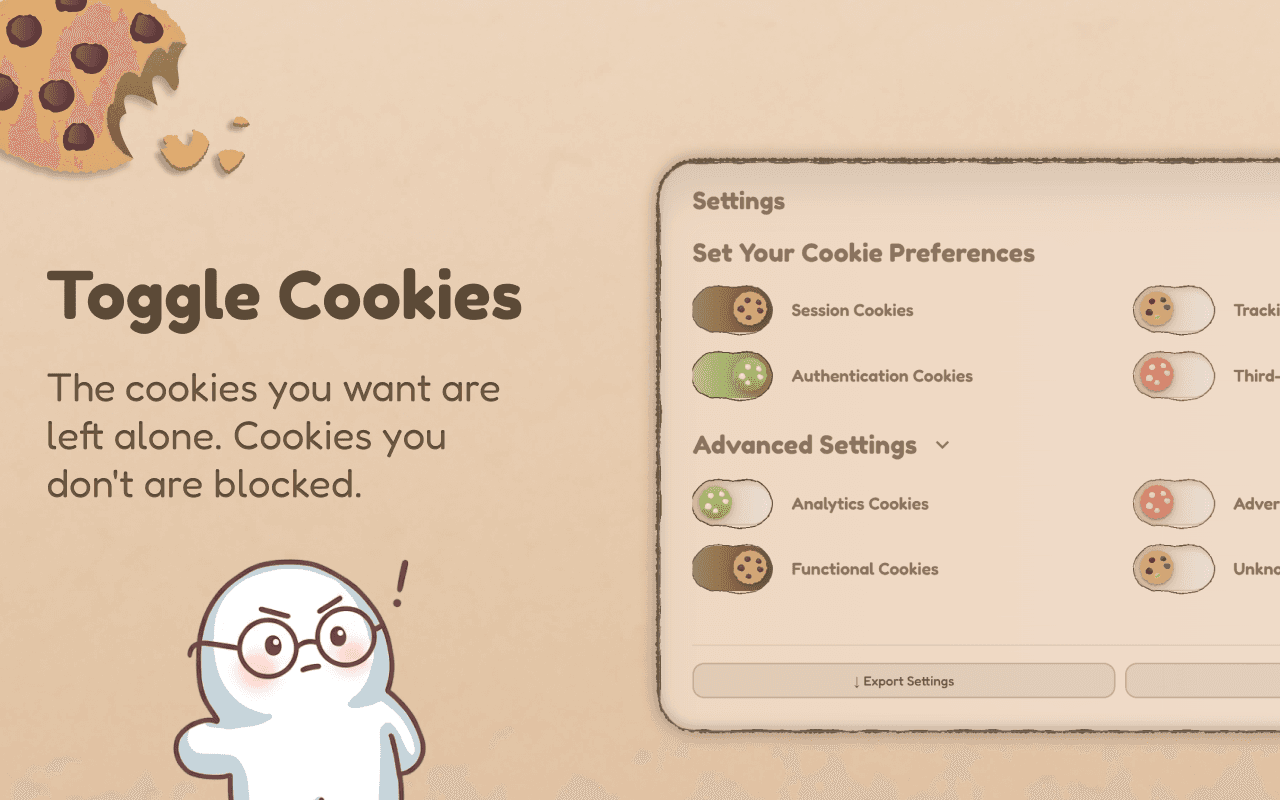
Cookie Jar intercepts cookies in real time and classifies them into eight categories. Four are allowed by default — things the site genuinely needs to function, like authentication, session management, and necessary functionality. Four are blocked by default: analytics, tracking, advertising, and third-party scripts that exist primarily to follow you around the web.
The classifier runs pattern matching against cookie names and domains from 50+ frameworks and platforms. When you visit a site, a service worker intercepts cookie operations before they settle, checks the category, and allows or blocks based on your preferences. You can override any category, pause the extension for a specific domain, or toggle between a simple view and a detailed breakdown of what's being blocked.
Most sites use a consent management platform — OneTrust, CookieBot, TrustArc — to show the cookie banners you see on almost every page. As of v1.1.0, Cookie Jar doesn't just hide them: it reads the consent dialog and clicks "Reject" or "Decline" for you, so you're opted out of non-essential cookies without touching a single banner. It does this entirely in your browser using DuckDuckGo's open-source autoconsent rule set (MPL-2.0), bundled with the extension — no remote code is downloaded or run, and nothing about which sites or banners you encounter is collected. When you turn auto-reject off, it falls back to the original behavior of hiding banners with a stylesheet. Getting to 100% on 31 tested sites required handling banners injected inside iframes, shadow DOM elements, and dynamically loaded scripts. A few sites needed site-specific selectors before they'd cooperate.
Building it
The extension is built on Manifest V3, Chrome's current extension format, which routes everything through a service worker rather than a persistent background page. Most of the core logic lives in three places: a cookie classifier that maps name and domain patterns to categories, a background service worker that intercepts cookie operations in real time, and a content script that handles consent banners on the page itself — auto-rejecting them through the bundled autoconsent rules, or hiding them with CSS when auto-reject is turned off.
The hardest bug to fix was one I introduced myself. An early version of the extension was too aggressive — it was blocking cookies during page load that OAuth providers set after authentication. So if you logged in with Google or Microsoft, the extension would delete the session cookie before the app could read it, landing you in a redirect loop.
The fix required building an explicit passlist for OAuth callback patterns across Google, Microsoft, Apple, Okta, and Auth0, and making the cookies.onChanged listener protect parent domains as well as the callback URL itself. The timing also mattered — the window between when the OAuth callback fires and when the app reads the resulting cookie is small, and the extension had to stay out of it.
What I'd do differently
The design was made in 24 hours, which means I inherited some decisions that were made fast. The popup is clean. The full-page view got complicated as features accumulated — it tries to do too many things at once. If I were starting from scratch I'd rethink that information architecture before writing a line of code.
It shipped. The Chrome Web Store approved it in May 2026. The honest next question is whether 'works on 31 tested sites' holds up at scale — the sites I didn't test are the interesting ones. I also want to revisit the full-page view's information architecture before the user base grows enough to make that disruptive.